Harbor container registry and GitLab CI: from build to Kubernetes
The build passes and the image is in the registry. This is about the three files that have to agree before Kubernetes will actually pull it, and the services around them that make that possible.
You have a pipeline that builds an image and a cluster that should run it. The pod comes up as ImagePullBackOff, and now you are checking whether the registry hostname in the pipeline matches the image name in the deployment, and whether the pull secret sits in the right namespace under the right name.
Those values live in three different files and they all have to agree. By the end of this article you will know which three, how we kept them in step on the internal developer platform we built on OVHcloud in 2026, and what the AI agent that writes them is actually allowed to do to the cluster.
Part 4 of six. You don't need the other parts to follow this one.
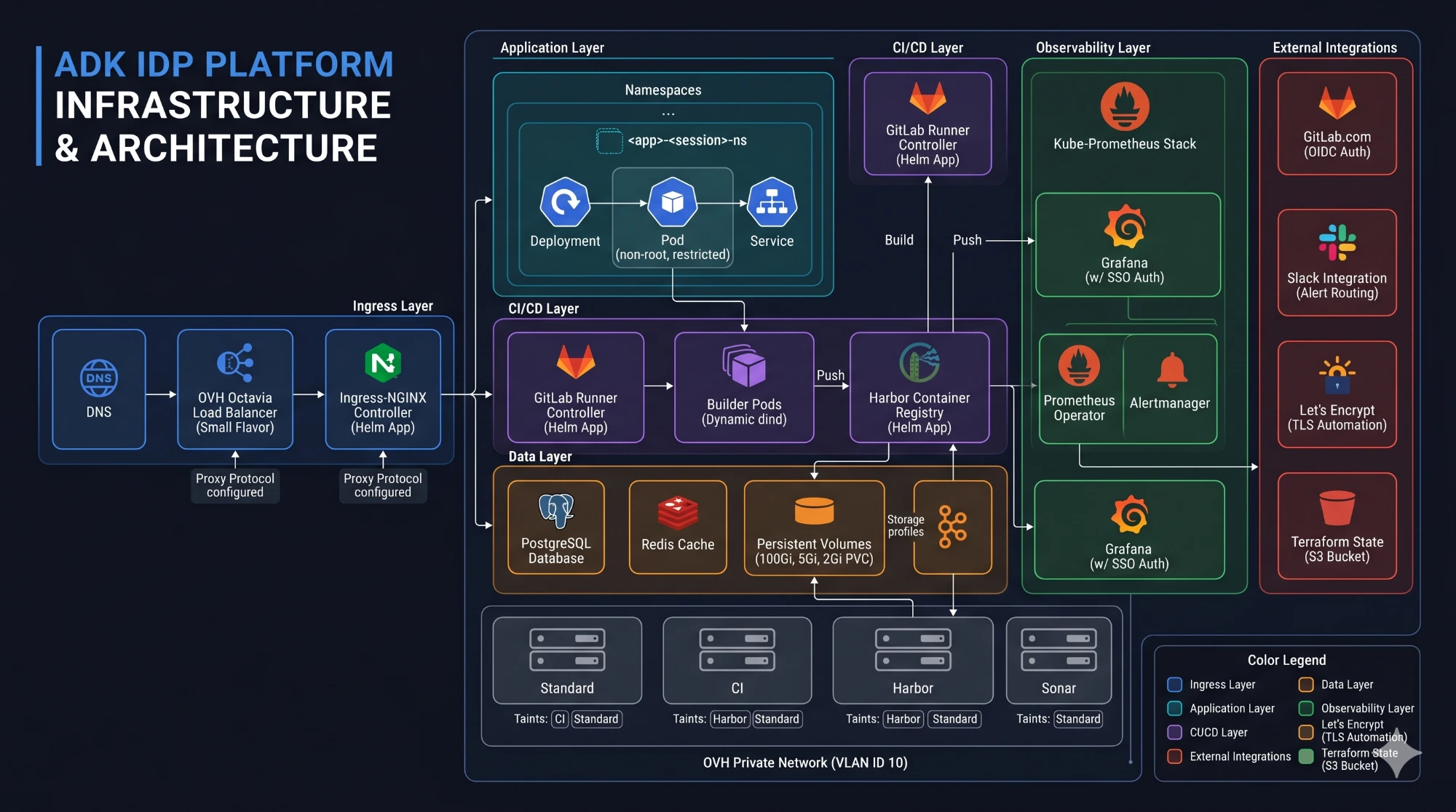
The whole platform plane in one picture: the layers described below, and the OVHcloud node pools underneath them.
Building images with GitLab Runner
The application pipeline runs on a self-hosted GitLab Runner using the Kubernetes executor. We direct CI workloads to the dedicated CI node pool from part 2, using a node selector and matching toleration.
Terraform defines the pool and its taint; the runner configuration places build workloads there.
The pipeline starts with SonarQube analysis, followed by the image build. SonarQube and its PostgreSQL database target a separate Sonar node pool.
The scanner waits for the quality-gate result, but the job also sets allow_failure: true, marked as a staging setting. Analysis therefore runs before the build without acting as a mandatory gate.
On main, the build job uses Docker-in-Docker and pushes the image to Harbor. The runner enables privileged execution for this setup. Each build publishes a short Git commit SHA tag alongside latest.
Connecting Harbor to application deployments
Harbor provides the shared container registry. Its core, registry, database, Redis and Trivy components target the Harbor node pool, with persistent volumes for the registry and supporting data.
The pipeline defines the Harbor hostname and project, then authenticates using robot-account credentials supplied through GitLab CI variables.
After pushing the image, a later job creates or updates an image-pull Secret in the application's target namespace. The deployment template includes the corresponding Secret reference.
The connection depends on values that appear across different files:
- The registry hostname and Harbor project.
- The image name and tag.
- The target namespace and image-pull Secret name.
Those values need to agree for the workload to retrieve the image produced by CI. The templates in part 5 carry these connections into the application configuration.
Once the application's Argo CD Application has been created during onboarding, Argo CD reconciles its tracked manifests. Harbor supplies the container image referenced by the workload.
Monitoring the shared platform
The cluster also hosts the services supporting that delivery flow. We use kube-prometheus-stack for Prometheus monitoring, Grafana and Alertmanager.
We adapted the configuration to OVHcloud Managed Kubernetes by disabling monitoring and associated rules for selected managed components, including the controller manager, scheduler and kube-proxy. The configuration comments explain the reason: avoid alerts caused by looking for components the setup does not expose.
Grafana reads its admin credentials from a Kubernetes Secret supplied during bootstrap. Alertmanager reads its Slack webhook from a Secret too, using the credential-injection mechanism from part 3.
Alertmanager's inhibition rules suppress lower-severity alerts when a matching higher-severity alert exists. The Slack template includes severity, a description, graph links and a runbook field populated from alert annotations.
That provides shared platform monitoring and notification routing. Application-specific metrics and dashboards still need their own instrumentation and configuration.
Configuring TLS and platform access
Harbor, SonarQube and Grafana expose interfaces through TLS-enabled ingresses. Their configuration selects the shared cert-manager issuer with an annotation:
cert-manager.io/cluster-issuer: "letsencrypt-prod"
Each ingress also specifies its hostname and TLS Secret name. The issuer configures Let's Encrypt with HTTP-01 validation.
For authentication, the agent interface's ingress connects to oauth2-proxy through authentication and sign-in annotations. The proxy uses GitLab as its identity provider and restricts access to a configured group:
extraArgs:
  gitlab-group: "your-org/idp-platform"
Its client credentials and cookie secret come from Kubernetes Secrets.
We put SSO in front of the agent interface; Argo CD and Grafana are not behind the same proxy. For TLS, the platform service ingresses use cert-manager, while the application TLS template still expects a manually supplied Secret.
So the platform services share one certificate setup, but not every interface or template follows the same convention yet.
What can the AI agent actually do to the cluster?
The Kubernetes agent acts under its own service account, and that account's permissions are deliberately narrow. It can create, update and delete Namespaces, Services, ResourceQuotas, Deployments, Ingresses, NetworkPolicies and Argo CD Applications. On Pods it can only read and delete. It cannot create a Pod at all, so workloads come into existence through a Deployment.
The MCP server the agents call runs under a separate account that is read-only: get, list and watch, nothing else.
One limit is worth naming. These permissions are cluster-wide. The rule that the agent stays inside the application's own namespace lives in its instructions, not in its permissions. The account bounds what the agent can do, not where it can do it. We return to that distinction in part 6.
From shared services to application templates
The runner executes the pipeline, Harbor receives its images, Kubernetes uses registry credentials, and Argo CD reconciles the application manifests. Monitoring and access configuration support the environment around that flow.
You can trace those connections in the application pipeline template and platform service manifests.
In part 5, we examine how Dockerfile, pipeline and Kubernetes templates carry these conventions into application onboarding, and how annotations guide the agent's edits.
Unsure how well the pieces of your platform fit together? Get a second opinion.
The environment we built this on is no longer running. The code is public, so you can read the architecture and the decisions behind it.
The full series
- AI platform engineering on OVHcloud: an internal developer platform experiment
- OVHcloud Managed Kubernetes with Terraform: from state to cluster
- Argo CD app of apps: from an empty cluster to platform services
- Harbor container registry and GitLab CI: from build to Kubernetes
- Golden paths: what should an AI agent be allowed to change?
- Google ADK agents for app onboarding: where human review fits

Cis Verbruggen