Google ADK agents for app onboarding: where human review fits
Three AI agents, one developer and a cluster. This is the onboarding workflow we built, and an honest account of which guardrails around it actually hold.

An agent that can open merge requests and apply manifests to your cluster can also be wrong, and it will be wrong faster than you can read. Anyone who hears the idea asks the same thing first. What stops it?
This article covers the AI layer of the internal developer platform we built on OVHcloud in 2026. Three agents built with Google ADK, the eight-step workflow they follow, the merge request where a developer decides whether any of it happens, and an honest look at which of the boundaries around them a machine actually enforces.
Part 6 of six. You don't need the other parts to follow this one.
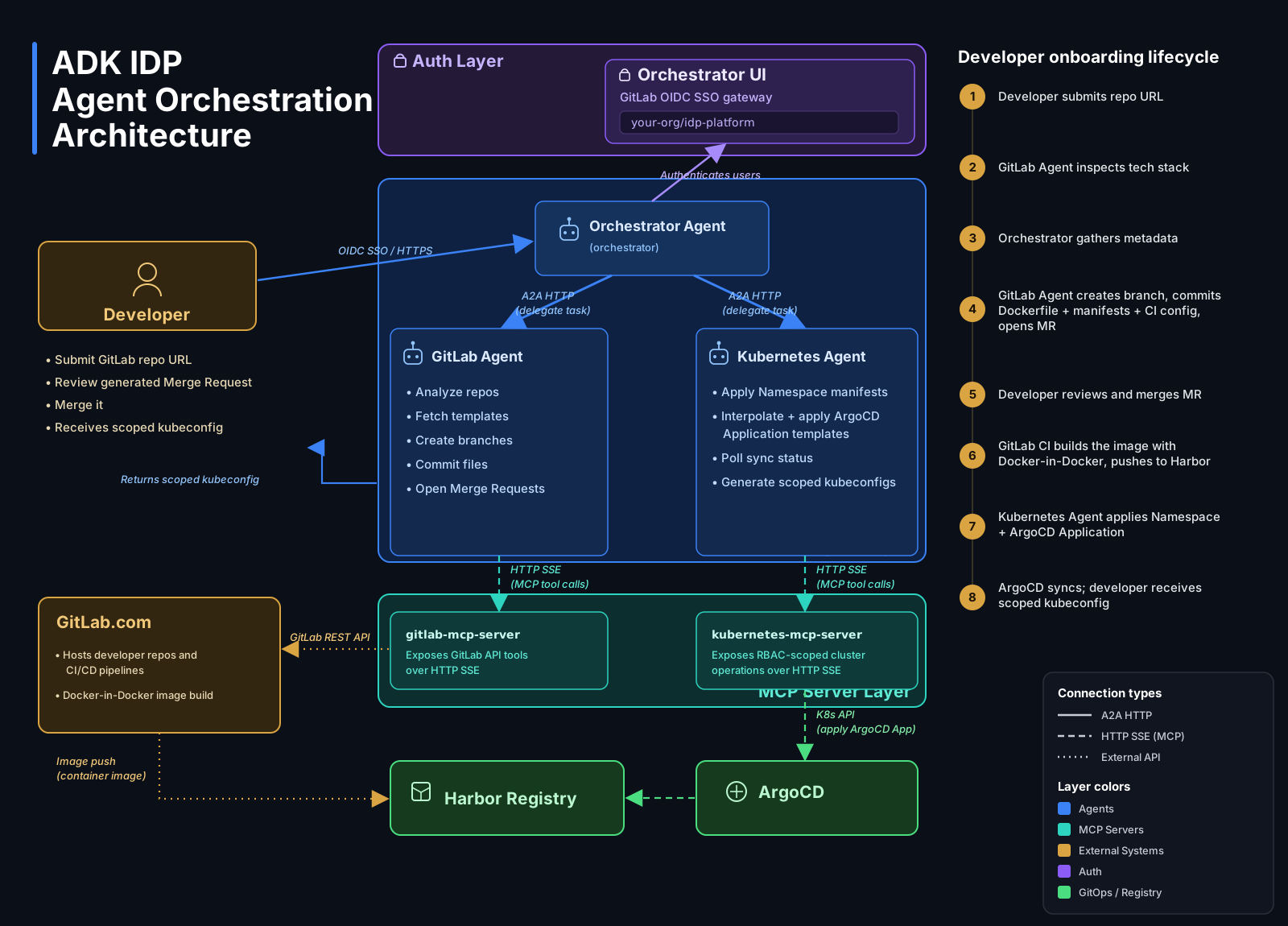
The three agents, the tools they reach over MCP, and the eight steps a developer onboarding runs through.
Three agents with different responsibilities
We built the control plane with Google's Agent Development Kit (ADK), assigning three roles to Gemini-backed agents.
The orchestrator handles the developer conversation, gathers requirements and coordinates the workflow. A GitLab agent inspects repositories, retrieves templates and prepares branches and merge requests. A Kubernetes agent fills manifest templates and receives tasks for cluster operations.
The specialist agents are instructed to report to the orchestrator. The developer interacts with one conversational interface while the orchestrator delegates the work.
There are two communication layers. The orchestrator connects to the specialists through Agent-to-Agent (A2A) interfaces, using service addresses discoverable through Kubernetes DNS. The specialists access GitLab and Kubernetes tools through Model Context Protocol (MCP) servers over Server-Sent Events (SSE).
A2A connects the agents; MCP connects the specialists to their tools.
From a repository URL to a proposal
The orchestrator's instructions define an eight-step workflow with success conditions and failure paths. It starts by accepting a repository URL within the configured GitLab group.
The GitLab agent examines the language, framework, package manager, ports and any existing Dockerfile or CI configuration. If the stack or port is unclear, the orchestrator should ask the developer to clarify.
Next come the application-specific requirements: its name, target namespace, service-account name, image name, resource tier and whether it needs external ingress.
These values become inputs to the templates from part 5. The workflow creates a branch named deploy/<app_name>-<session_id> in the existing application repository, retrieves the templates and fills their editable sections.
The proposed files include the Dockerfile, GitLab pipeline and application manifests. The manifests are prepared before the merge request, so the developer can inspect the build and deployment configuration together.
The instructions prohibit creating a new repository, pushing directly to the default branch or overwriting existing project files. The intended scope is to add deployment configuration through a separate branch.
The developer reviews the files
The orchestrator presents the merge request URL and asks the developer to review the files, configure the required CI credentials and merge when satisfied. It must wait for explicit confirmation that the merge has happened.
The developer has a concrete proposal to assess: runtime settings, image references, resource values and networking configuration are visible in the branch.
After confirmation, the orchestrator delegates pipeline-status checks to the GitLab agent. If the pipeline fails, the workflow should stop before the Argo CD bootstrap and report the failure for investigation.
The build remains a GitLab CI job. The agent coordinates the sequence and reports its status; the runner executes the build and registry operations described in part 4.
Connecting the application to Argo CD
After the pipeline passes, the workflow instructs the Kubernetes agent to apply the Namespace manifest and prepare an Argo CD Application.
That Application points to the original application repository, monitors main and uses its manifests/ directory. The agent is instructed to apply it directly to the cluster, then poll for Synced and Healthy status.
The agent therefore remains involved in initial bootstrap after the merge request. The Argo CD Application is prepared at this later stage and is not part of the earlier review.
Once connected, Argo CD reconciles the tracked application manifests. The workflow finishes with a deployment summary and also includes an attempt to retrieve service-account credentials, reporting if that retrieval fails.
Our AI in DevOps article discusses AI around delivery automation. Here, AI helps prepare configuration and coordinate onboarding, CI executes the pipeline, and Argo CD handles reconciliation.
Instructions define the intended behaviour
Much of the orchestration logic lives in natural-language instructions: the sequence, repository restrictions, approval checkpoints and template-editing rules.
We specify what should happen when information is missing or a step fails. An uncertain port should lead to a clarification question. A failed pipeline should stop the workflow before bootstrap. The orchestrator should wait for confirmation that the developer has merged the files.
These rules are easy to inspect in the agent definitions, but following them is not deterministic.
As discussed in part 5, [AGENT-LOCK] comments tell the agent which configuration to preserve. They do not independently prevent edits. Similarly, "never push directly to main" is an instruction to the agent; it does not configure repository permissions.
The merge request gives the developer an opportunity to inspect the generated files.
That is the full set of boundaries, and they are not equally solid.
The agent's instructions are not enforced. Neither are the template annotations: nothing validates that the locked lines came through unchanged. The service account's permissions are enforced, by Kubernetes, every time the agent calls the API. And the merge request is enforced by the workflow, because the files reach the default branch only after a person merges them.
So of the four boundaries in this design, two hold on their own and two describe an intention. That is worth knowing before you put an agent in a position to change infrastructure: write down which of your guardrails a machine would stop, and which rely on the model doing what it was told.
Looking back at the experiment
The six parts describe one onboarding path, built across several layers:
- Terraform provisions the OVHcloud infrastructure.
- Argo CD manages the tracked platform configuration.
- Shared services provide CI execution, image storage and platform monitoring.
- Templates capture the application configuration conventions.
- The AI control plane gathers inputs and coordinates onboarding.
This remains a proof of concept. There are no automated tests, the AI layer's behaviour is non-deterministic, and the implementation is tied to a particular OVHcloud, GitLab and Gemini setup.
The experiment gives us a concrete way to examine how AI can help developers use a platform: analysing a repository, filling templates, presenting files for review and coordinating the initial connection to CI/CD and GitOps.
The original environment is no longer running, but the code lets you follow that workflow across the layers. Explore the orchestrator alongside the template library, or return to part 1 for the architecture overview.
Considering where AI could fit into your delivery workflow? Get a second opinion on your setup.
The environment we built this on is no longer running. The code is public, so you can read the architecture and the decisions behind it.
The full series
- AI platform engineering on OVHcloud: an internal developer platform experiment
- OVHcloud Managed Kubernetes with Terraform: from state to cluster
- Argo CD app of apps: from an empty cluster to platform services
- Harbor container registry and GitLab CI: from build to Kubernetes
- Golden paths: what should an AI agent be allowed to change?
- Google ADK agents for app onboarding: where human review fits

Cis Verbruggen