

.jpg)
Introduction: The Problem with Static Database Passwords
This is part 4 of our HashiCorp Vault production series. Remember those database passwords stored in your .env files? The ones that haven't changed since 2019? Yeah, we need to talk.
Series overview:
- Production Kubernetes Architecture with HashiCorp Vault
- Terraform Infrastructure for HashiCorp Vault on EKS
- External Secrets Operator: GitOps for Kubernetes Secrets
- Dynamic PostgreSQL Credentials with HashiCorp Vault
- Vault Agent vs Secrets Operator vs CSI Provider
- Securing Vault Access with Internal NLB and VPN
Let's explore how Vault's database secrets engine creates temporary credentials that actually expire.
What is Vault Database Secrets Engine?
The Vault database secrets engine is a game-changer for database security. Instead of sharing that one DB_PASSWORD across your entire team (we've all been there), Vault generates unique, temporary credentials for each application or user.
Dynamic vs Static Database Credentials: Why It Matters
Traditional static credentials are like house keys,lose one, and you need to change all the locks. Dynamic credentials are like hotel keycards, each guest gets their own, and they expire automatically.
Benefits we've seen in production:
- No more password rotation tickets
- Automatic cleanup of unused accounts
- Zero hardcoded passwords in applications in this setup
- Complete traceability. You know exactly which app made which database call, essential for regulatory compliance
The shift from static to dynamic credentials fundamentally changes your security posture. Instead of defending long-lived secrets, you're managing short-lived access that's automatically cleaned up.
How Dynamic Database Credentials Work in Vault
Our setup uses Vault to dynamically create PostgreSQL users with temporary credentials.
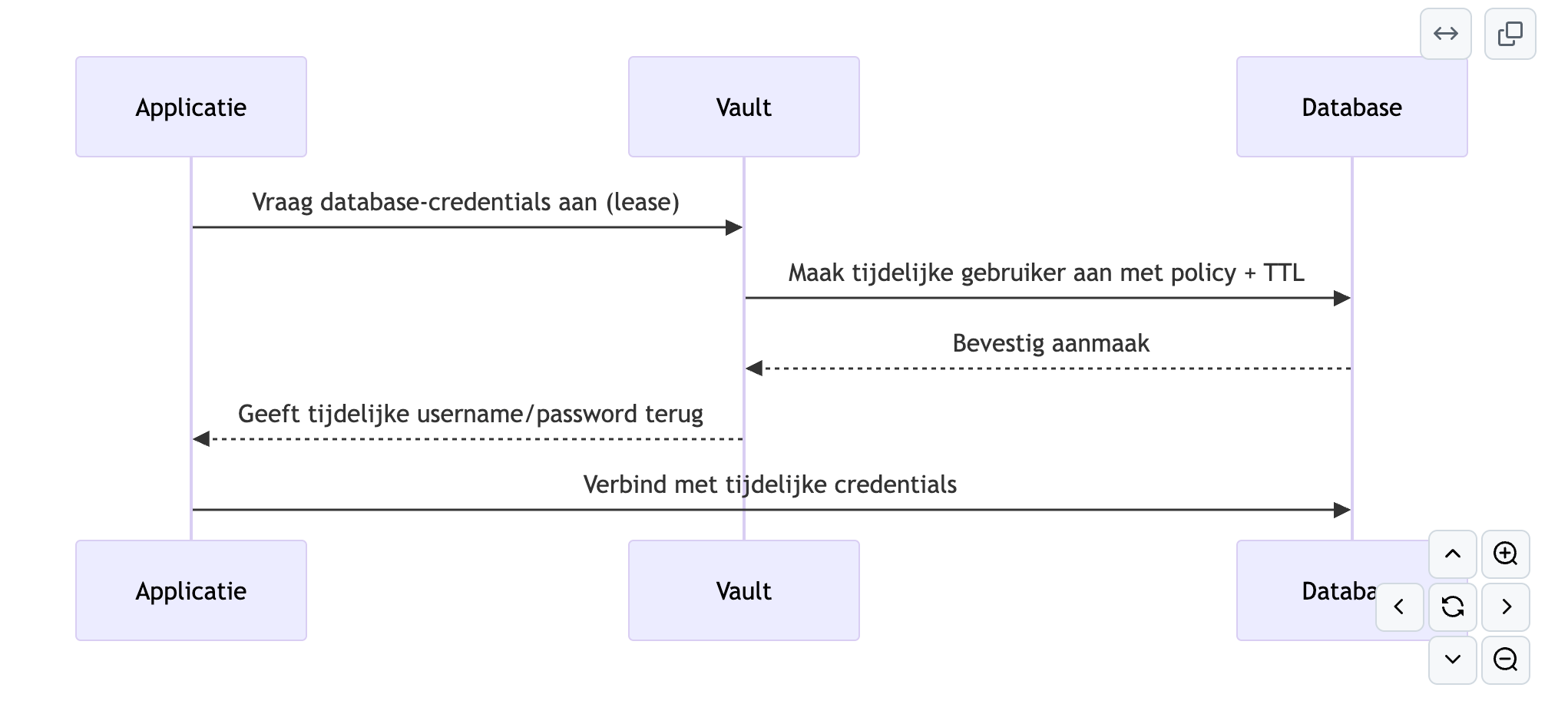
The magic happens in four steps:
- Application requests credentials from Vault
- Vault creates a temporary PostgreSQL user with specific permissions
- Vault returns the credentials with a lease
- Application connects using these temporary credentials
Configuring Vault Database Secrets Engine for PostgreSQL
Enable the Database Engine
First, enable the database secrets engine in Vault:
vault secrets enable database
Configure PostgreSQL Connection
Set up the connection to your PostgreSQL database:
vault write database/config/my-postgres-db \
plugin_name=postgresql-database-plugin \
allowed_roles="app-role" \
connection_url="postgresql://{{username}}:{{password}}@db.example.com:5432/mydb" \
username="vaultadmin" \
password="securepassword"
Define the Database Role
This is where you specify what the temporary users can do:
vault write database/roles/app-role \
db_name=my-postgres-db \
creation_statements="CREATE ROLE \"{{name}}\" WITH LOGIN PASSWORD '{{password}}' VALID UNTIL '{{expiration}}';" \
default_ttl="1h" \
max_ttl="24h"
Key settings in our production setup:
- default_ttl: 1 hour (applications get fresh credentials hourly)
- max_ttl: 24 hours (hard limit for any credential)
Integration with Kubernetes Applications
In Kubernetes, applications authenticate with Vault and receive their database credentials. Using the Vault Agent (covered in detail in part 5), credentials are injected as files into pods.
The beauty? Your application code doesn't change. It just reads database credentials from a file path, unaware they're being dynamically generated and rotated.
What's Next?
We've covered dynamic database credentials, but how do you get these credentials into your pods? That's where Vault Agent comes in - our topic for the next post.
The complete configuration is available in our GitHub repository, including:
- Full database engine setup
- PostgreSQL role configurations
- TTL best practices
- Integration examples
Continue reading: Vault Agent vs Vault Secrets Operator




.jpg)